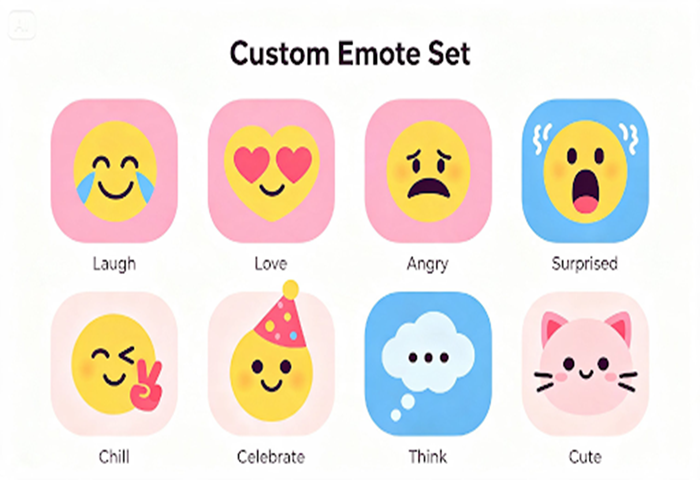
In a fast-moving chat, words often can’t keep up — but a single well-timed emote can say everything in an instant. Communities build entire micro-languages around their emotes, and a generic default set rarely captures the specific humor and energy that makes a server or channel feel like home.
A free AI image generator tool changes that equation completely, letting you design emotes that actually reflect your community’s personality instead of borrowing someone else’s. Dreamina is particularly well-suited to this kind of work, producing bold, expressive characters that hold up even at the tiny sizes emotes are usually viewed at.
Let’s build a set your community will actually use every day.
Why emotes carry more weight than words in chat
A single emote can convey sarcasm, celebration, or secondhand embarrassment faster than typing a sentence ever could. That compression is exactly why custom emotes matter — they become shared shorthand, referenced and reused until they’re practically part of the community’s vocabulary.
Reading your community’s humor before you design
Before opening Dreamina, spend a moment thinking about what actually makes your community laugh. Is it chaotic and reaction-heavy, dry and understated, wholesome and supportive? That tone should shape every expression you design, not just the first one.
- Chaotic communities lean toward exaggerated, over-the-top expressions
- Dry-humor communities lean toward deadpan, subtle expressions
- Wholesome communities lean toward warm, soft expressions
Keeping one character consistent across many faces
The strongest emote sets often center on a single recognizable character shown in different emotional states, rather than unrelated designs scattered across the pack. Locking in consistent features — hairstyle, color palette, signature accessory — in every prompt keeps that character identifiable no matter which emote someone reaches for.
Turn one idea into a full emote pack in three moves
Dreamina makes producing an entire set feel manageable rather than overwhelming.
Step 1: Write a text prompt
Go to Dreamina and write a detailed text prompt describing your emote character and their specific expression, including art style and color palette. Add a reference image if you already have a character design to keep consistent.
Example: An emote illustration of a person dressed as a shocked streamer with wide eyes and an open mouth, exaggerated surprised expression, bold outlines, flat saturated colors, circular emote crop.
Step 2: Adjust parameters and generate
Select Image 5.0 Pro, powered by Seedream 5.0 Pro, for crisp, bold linework and reliable expression detail, then set your aspect ratio to a square format, choose your canvas size, and pick 1K or 2K resolution depending on where the emote will be used. Click the generate icon to create it.
Step 3: Customize and download
Refine each emote using Dreamina’s tools: inpaint to adjust specific facial features, expand to give the design more breathing room before cropping, remove to clean up any stray details, and retouch for a crisp final finish. Once it’s ready, click Download.
Dreamina: a creative tool with multiple image generation models
Dreamina isn’t built around a single engine — it gives creators access to several image generation models, and Seedream 5.0 Pro, the newest and most capable option, is especially valuable for emote work.
Its precise editing lets you swap one small detail, like an eyebrow angle or a prop, without regenerating an entire character from scratch, which is exactly what a growing emote pack needs as you expand it over time. Its layer-based control also treats each emote as addressable parts rather than one flat image, making it easier to adjust a mouth shape or hand position independently while keeping everything else locked in place.
Alongside Seedream 5.0 Pro, Nano Banana offers quick generation for testing rough expression ideas before committing to a polished version, and GPT Image 2 handles detailed emotional description closely, useful when a specific expression needs precise instruction to land correctly.
Sizing and shape rules that keep emotes legible
Emotes are almost always viewed small, so clarity matters more than intricate detail. A few practical guidelines:
- Keep the design centered with minimal empty space around the edges
- Use bold, simplified shapes rather than fine linework
- Test how the design looks shrunk down before finalizing it
Color choices that pop against dark and light chat themes
Since chat platforms often let users toggle between light and dark themes, testing your emote against both backgrounds matters. High-contrast outlines and saturated colors tend to hold up well regardless of the surrounding theme, while pale or low-contrast designs can disappear entirely on certain backgrounds.
Expanding a starter pack into seasonal or event editions
Once your core set is established, seasonal variations — holiday outfits, event-themed props, special occasion expressions — keep the emote pack feeling fresh without requiring an entirely new character each time. This is also where Seedream 5.0 Pro’s precise editing genuinely shines, letting you swap a hat or background detail while keeping the base character exactly consistent.
Where these emote sets get used
Custom emote packs show up across nearly every corner of an active community:
- Discord and Slack server reactions
- Twitch and streaming platform chat culture
- Community merch and sticker spinoffs
- Welcome messages and milestone celebration posts
Animating expressions for extra personality
A static emote already carries a lot of charm, but a subtle animated version — a blink, a slight bounce, a flicker of sparkle — can make a reaction feel even more alive in a fast-moving chat. Start from your finished static design and describe the small motion you want layered on top, keeping it brief and looped rather than a full sequence, so the emote still reads instantly at a glance.
Handling requests and feedback from your community
Once your set is live, community members will inevitably ask for specific new emotes tied to inside jokes or recurring moments. Keeping a running list of these requests, and prioritizing the ones referenced most often in chat, helps your emote pack grow in a direction that actually reflects what the community wants rather than guesses made from the outside.
Give your chat a whole new vocabulary
A generic emote set gets the job done, but a custom one becomes part of how your community actually talks to each other.
With Dreamina and the consistency-focused precision of Seedream 5.0 Pro, building that full expressive vocabulary is fast, genuinely fun, and free to start with your very first emote today.